Wednesday, September 3, 2014

Under Desk Gun Safe - How to safely keep a Gun at work.

So after having my neighbor shot dead in his driveway and having some guy get shot in my office complex parking lot (our office building was roped off inside the crime scene) I decided I had been to close too many times. So I got my Concealed Carry License and started carrying my gun with me every where I go. Well that includes the office. Fortunately I work for a firm that also believes in our 2nd amendment right and many of us carry and keep our guns in the office.

But I was worried that with our clients coming and going and many of the employees occasionally bringing their children to work, it just wasn't a good idea for us to have loaded handguns in our desk drawers or computer bags. So I started looking for solutions. I needed something that could be mounted securely under my desk, use a simple combination to open and that would accommodate a medium framed automatic pistol.

I came up with two viable options

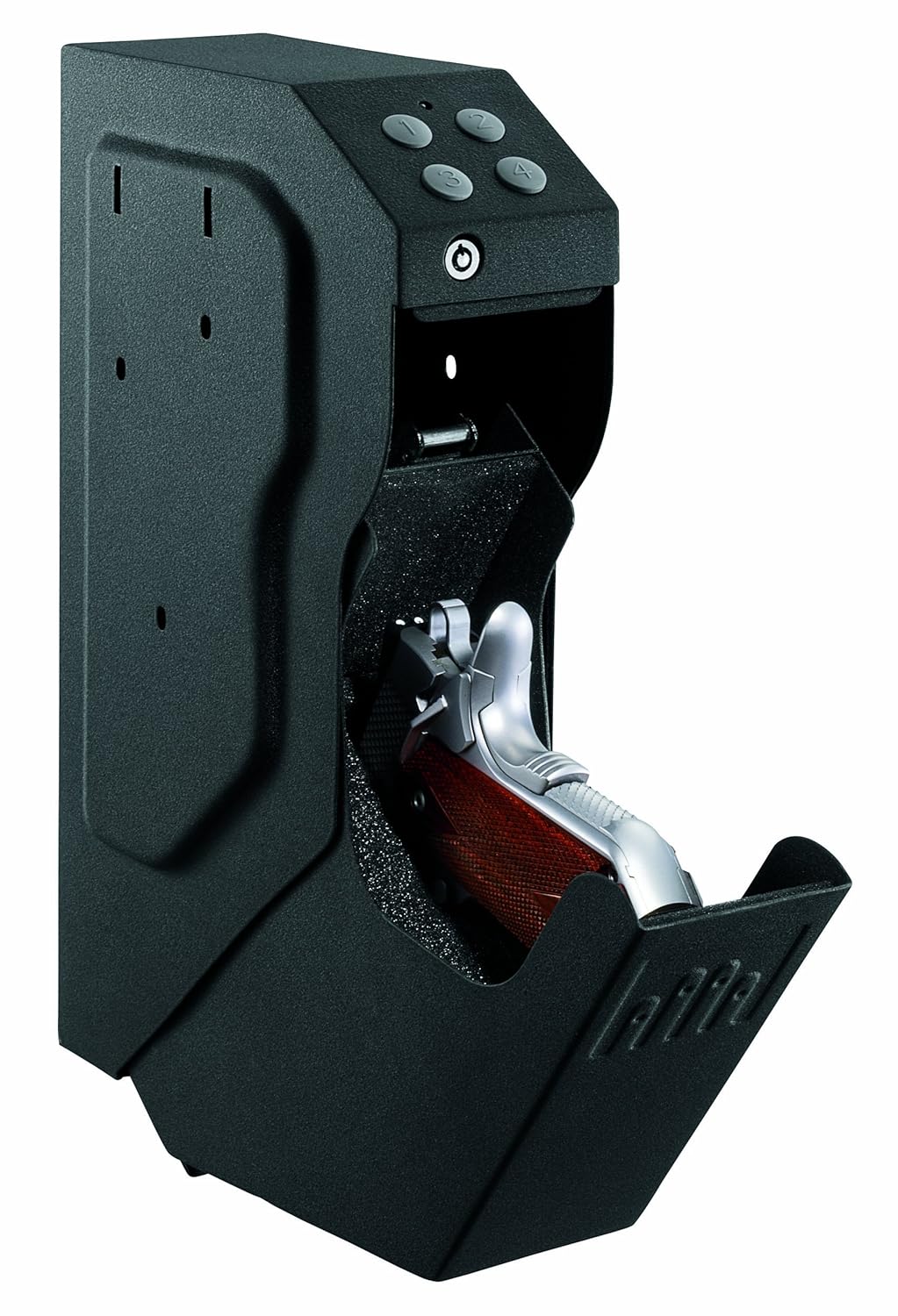
The Gunvault SpeedVault SV500 gun safe


And the HOMAK HS10036683 Electronic Access Pistol Box
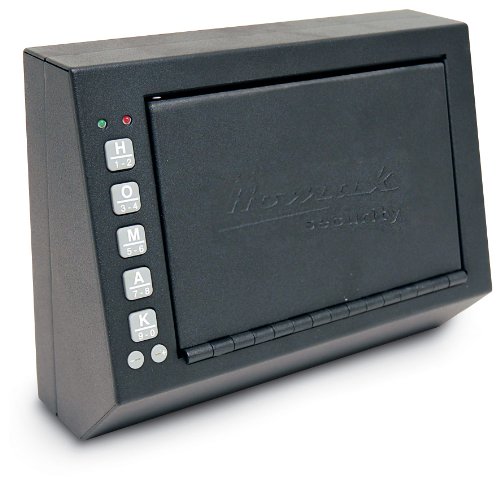
HOMAK HS10036683 Electronic Access Pistol Box, 10 X 3.5 X 7.5 Inch
The Gunvault SpeedVault SV500 gun safe priced at about $150 (often on sale for less) has EVERYTHING you would want. It's easy to install, easy to use, has a key backup and when it opens a LED lights up your ready to draw pistol and you are ready to rock and roll. They even have one that just uses your fingerprint to open!

The HOMAK HS10036683 Electronic Access Pistol Box is not as fancy, does not have a key backup (but has a emergency backup in case the batteries die) and is not designed for a speedy draw of your weapon. But it's about $100 less than the SpeedVault.

In my case, being able to rapidly draw my pistol from under my desk wasn't the main concern.
Keeping a loaded handgun in my office and close but safely away from others was. So I went with the HOMAK.

Now my pistol is safely tucked away under my desk and I have peace of mind.
I still think I will purchase the SpeedVault  for my home though. That is one place where I want a fast easy access gun safe that I can put beside my nightstand, next to my bed.


Thursday, March 27, 2014

So even though I swore I would never do Kickstarter again I found this little gem called the MICROVIEW and had to buy in. I love messing with Arduinos and making cool stuff and this just looked too cool to pass up (plus these guys have a good history so I feel good about backing them). I don't know what I will do with one of these, but I have lots of ideas.

Check it out, there is still time to get in (20 days left as of today).


Thursday, January 23, 2014

Midland XTC 200 Action Camera , an alternative to the GoPro Camera

So This isn't necessarily about electronics but I got this little camera when I was in Hawaii and I thought I would give you my thoughts on it. If you are looking for all the technical information go to the Midland website. This is the stuff they don't tell you.

It's a pretty cool little camera, a less expensive choice than something like the GoPro.
You can shoot HD 720p (1280 x 720 @ 30FPS) or SD 480p (640 x 480 SD @ 60FPS) by flipping a little slide switch under the rear cover.

At 480p a 2 gig file will get you about 38 minutes.
At 720p a 2 gig file will get you about 25 minutes.
You can shoot until your battery runs out or you run out of space on the card (up to 32gb)
Videos will only be a max of 2 gig in size. If you just turn it on and leave it going it will simply film up to 2 gig and then start filming a new clip.
The Camera has no clock so all the files have the same date and time stamp on them (1/1/2010 12:00am).

Reuse the display mount.
Don't just throw away the box it comes in. Your package may not be the same but mine came with the camera mounted to a piece of clear plastic. What it was mounted with was a clip just like the ones that are on the Helmet mounts. I undid a couple of little screws and what came off the package ended up working perfectly for clip mounting the waterproof case to my Goggles for getting some great footage while snorkeling. I simply put the strap right between the clip mount and the waterproof camera case. Worked perfectly.


Speaking of the waterproof case, use caution.
  1. Don't put the camera in the case with the record switch in the forward (rec) position.
    It will stick to far out the back and break the latch.
  2. Be careful with that latch. Sadly it is very easy to break. It should be made of aluminum or nylon or Delrin.

Obviously it shoots better video than this!

The waterproof case has a magnetic slide switch to activate the camera. I found that placing a strong enough magnet over the front of the camera switch area will turn it on.
This means you could put it in a RC airplane or Helicopter and turn it on or off by either physically moving a magnet over it with a relay or by enabling an electromagnet over it.

I use mine as a daily Dashboard Cam waiting to capture the next OH SNAP moment!
It has gone for Train rides on my Model Railroad.
I stuck it on the top of my Grandson's RC Car for a cool ground view, it was very bumpy!!


Oh and the Helmet Mount, no where in the instructions does it tell you how to rotate the helmet mount.
The tell you that it does rotate, but they don't tell you how! This thing is held together with some serious industrial Velcro-type material. You have to pull it apart and it takes some serious pulling. I sort of rocked it out of the little socket. Once you get it apart, it's pretty easy after that, but the first time you do it you are going to think that it is going to break before it comes apart. 


Helmet Mount


Friday, January 18, 2013

Got My Digispark and Relay Shield!!

I got my Digisparks (www.digistump.com) and a relay shield yesterday.

This little bad boy is tiny and cool because it plugs right into a usb port, no cables or anything!

I will be replacing my full sized Arduino UNO and Multi relay shield being used on my coffee maker (Phil-Up) with this bad boy.

At first I was going to just pull the old stuff out and rewire this one in. But since it is so small, I think I will now build a small control panel out of a hobby box, put the digispark/relay unit, the button and the light all in one box with a small headphone jack to plug in the moisture sensor and mount the box under the counter (currently I have the light and button mounted in holes drilled in a piece of wood hanging on the front of the counter, the UNO and large relay shield mounted under the counter and wires running everywhere!

Monday, November 26, 2012

smARtDUINO Arduino projects without the wires!

So I just backed this new project on Kickstarter.com  called smARtDUINO.
It's an Arduino compatible system that uses a couple of nice connectors to allow you to connect modules together to do prototyping without wires.

You snap the processor (there are a couple choices) onto a power module and snap that to a bus connector.
From there you can snap on LED's or switches, relays, GPS modules, all sorts of things.
Even to the point of connecting multiple processor cores to one unit!


It's really pretty cool, I can't wait to get my hands on my starter kit and see what I can do.

They even have a module that will allow me to connect the Digispark (see post below) to the system and a board that will give you the full Arduino pinout so you can use Arduino Shields with the smARtDUINO.

Update - January 2014: Finally after over a year of waiting (Estimated delivery was November 2012)  I got my smARtDUINO parts. This was the project that killed Kickstarter for me. I'll never back another project on Kickstarter for sure. And if I am ever fortunate enough to meet Dimitri Albino in person, I hope to kick him in the man parts. This creep took $157,571.00 dollars and made a lot of promises only to follow them up with a lot of excuses. There were claims of Fraud and Misrepresentation. My plan is to one day assemble something out of the parts and then dump it all in a blender and grind it into little pieces of yellow dust.
I'll do my experimenting using some other version of Arduino. For now the parts sit in my basement still in the bag. I lost all interest in fooling around with this garbage months ago.

Tuesday, August 28, 2012

Just how small can an Arduino get? Meet DigiSpark!


**** UPDATE ****
WOW, This dude raised $313,318.00 of the $5000.00 he had hoped to raise!

He got 5964 backers.

Erik Kettenburg has a project up on Kickstarter that looks really awesome and it certainly looks like he's getting his backing! With 12 days to go, he has raised over $195,000 (of a $5000 goal) with over 4000 backers (Me being one of them!).

The product he is working on is a micro-sized Arduino (about the size of a quarter) called the DigiSpark.
I love the logic of this product. It's small and cheap enough that you can actually build it into a project. One of the biggest problems most of us hackers and builders face is creating something and then having to tear it all apart again to get our prized Micro-controller back out and reuse it to build another experiment. I have a full sized Arduino Uno dedicated to my Coffee pot project that I only use 4 of the pins for. This little guy would be much better suited for that purpose (especially when I get the smaller relay shield).

And at under $10 each, I'm getting 3 to start off with (and 1 relay shield).

It will feature
  • Support for the Arduino IDE 1.0+ (OSX/Win/Linux)
  • Power via USB or External Source - 5v or 7-35v (automatic selection)
  • On-board 500ma 5V Regulator
  • Built-in USB (and serial debugging)
  • 6 I/O Pins (2 are used for USB only if your program actively communicates over USB, otherwise you can use all 6 even if you are programming via USB)
  • 8k Flash Memory (about 6k after bootloader)
  • I2C and SPI (vis USI)
  • PWM on 3 pins (more possible with Software PWM)
  • ADC on 4 pins
  • Power LED and Test/Status LED (on Pin0)
And of course it is totally Open-Source/Hardware.

Let's see, the coffee maker will get one, there's a TV remote control that I want to build, these would fit perfectly in an HO train car, my Radio controlled cars might get some smarts, maybe my helicopters too, uh-oh....I'm going to need to order more of these when they become available on the Digistump.com website in December!

Monday, August 27, 2012

SeeedStudio 2.8" TFT Touch Shield (touchscreen/LCD)

My Opinion/Review: DON'T BUY ONE!

As fun and as cool as this thing may seem, you don't want one.
Why is the SeeedStudio 2.8" Touch Shield a piece of Junk?
  1. Horrible Documentation
  2. Several bugs in the library itself.
  3. Horrible to use, does not support print, println, write or anything useful.
  4. Not an easy task to print variables.
  5. Takes all the pins except I/O and A4/A5.
  6. No Backlight control.
  7. No Clear Screen function.
  8. Touch screen is not very precise or sensitive.
If you want an LCD display for your Arduino, I would look elsewhere.
This one will frustrate you!